How to make Google display FSP ads
instead of its own PSA ads, Part 2
This is Part 2 of a two-part procedure for altering your Google AdSense code to serve up Free State Project ads instead of generic Public Service Announcements when AdSense has no targeted ad to display. Part 1 showed you how to generate the code itself; Part 2 will show you how to implement the code and create the HTML file for serving the Free State Project ad of your choice in place of Public Service Announcements (PSAs) that Google chooses.
(If you somehow landed here at Part 2 without first reading Part 1, you might want to go back and read that first.)
Part 2: How to implement the code
1. Remember the code that Google AdSense generated for you in Part 1?
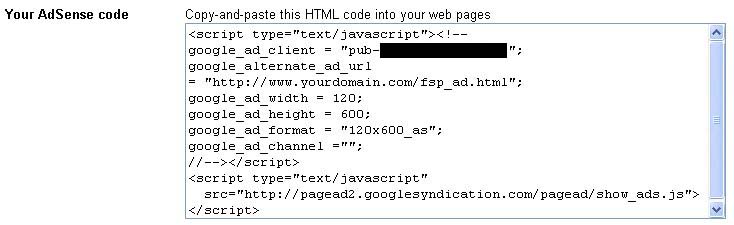
Copy -- in its entirety -- the code that Google generated for you in the Your AdSense code box and paste it into each of your webpages on which you want to display FSP ads:
Notice that the code refers to the URL we put into the Alternate ad url or color box: http://www.yourdomain.com/fsp_ad.html:

Again, for yourdomain.com you will have, of course, subsituted your web domain name.
2. Using your HTML editor (or whatever program you use to create and edit your web pages), create a page named fsp_ad.html. (This page can have a different name from the one we're using for our example, of course -- just make sure to use the same filename you gave Google to incorporate into your AdSense code.)
This page needs to tell AdSense two things:
- the location of the FSP ad you want it to display, and
- the url of the website you want to open when a user clicks the FSP ad.
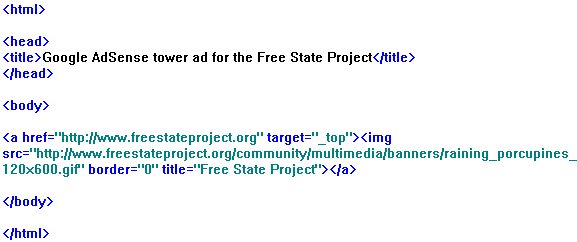
Below you can see the contents of the FSP tower ad HTML file that I use on my site:
Let's take note of some things in the code:
- "http://www.freestateproject.org/community/multimedia/banners/raining_porcupines_120x600.gif" gives AdSense the location of the banner ad to display when it has no targeted ad to show. (It would be possible, of course, to save a copy of the ad to one's own server, rather than have the ad served from the FSP site, but I figure it might be better for the FSP to see how many times its ads are being served all over the web. I imagine they'll let me know soon enough if they'd prefer otherwise...)
- "http://www.freestateproject.org" tells the reader's browser to open the Free State Project website whenever someone clicks the FSP ad on your page.
There are a couple of other things worth noting, as well:
- First, the border="0" code. If you'd prefer that people see a border around the ad, so that it might be more apparent that it is clickable, change the 0 to a 1 (higher numbers make for a thicker border).
- Second, and more importantly, notice the target="_top" code. This is crucial. If it is missing, AdSense will try to open the Free State Project home page in the tiny space of the ad itself, rather than using the whole browser window, as it should.
3. After you implement your FSP ads, you'll want to test that they're working properly. This can be tough, if you have pages for which AdSense has no trouble finding targeted ads. I have an article about so-called "smart drugs" and noticed that repeated use of the word *drugs* seems to be enough to prevent Google from running an ad. Which is good, because it means that (1) the FSP gets both a banner ad and a tower ad on that page every time, and for that reason, (2) it's the perfect page for testing. You might find that creating a webpage with no content other than the ads themselves works just as well.
Note to those with large websites: If you have lots of pages on which you'd like to put the code, you can make use of shortcuts so that you don't have to paste the AdSense code physically into every page every time you want to make an ad change. On my site, which has about 6,000 pages, I implemented server-side includes for that very purpose. Server-side includes make it possible for me to manage my ads by altering only one file, so that I can at any time change -- across the entire site -- what FSP ad runs, or even make my own ad to address something topical if need be.
And that is that. If you have questions, feel free to contact me (though I will warn you that despite having so many web pages out there, I am no kind of web guru whatsoever).
|